Meet Lattice, your coding agent for computational design
You describe the design intent. Lattice writes the Python, C# or Grasshopper, runs it in your live Rhino model, and turns it into tools you and your team can reuse.
Your tools
 Rhino 8
- Grasshopper
 Python 3
- C#
- IronPython
Any model
 Claude
 GPT
- Kimi
 Grok
 GLM
 DeepSeek
 Qwen
 MiniMax
Any agent
 Lattice
- Claude Code
- Codex
 Cursor
 opencode
Build tools, not one-offs
Every script Lattice writes is a file in your project. Run it again with one click, refine it, version it with git and share it with your team. Spend your AI usage on tools that keep paying off, not on actions you'll repeat tomorrow.
studio-toolkit — Latticestudio-toolkit
- facades
- panel_numbering.py
- panel_flatness.py
- structure
- export_columns.py
- beam_tags.cs
- standards
- layer_standard.py
1#! python32import rhinoscriptsyntax as rs3from toolkit.geometry import sort_into_rows45def number_panels(panels):6 """Number panels by row and column."""7 rows = sort_into_rows(panels, tolerance=0.01)8 for r, row in enumerate(rows):9 for c, panel in enumerate(row):10 mark = f"P-{r + 1:02d}-{c + 1:02d}"11 rs.SetUserText(panel, "Mark", mark)12 return len(panels)1314panels = rs.GetObjects("Select panels", rs.filter.surface)15count = number_panels(panels)16print(f"Numbered {count} panels")
Output
Output will appear here when you run code…
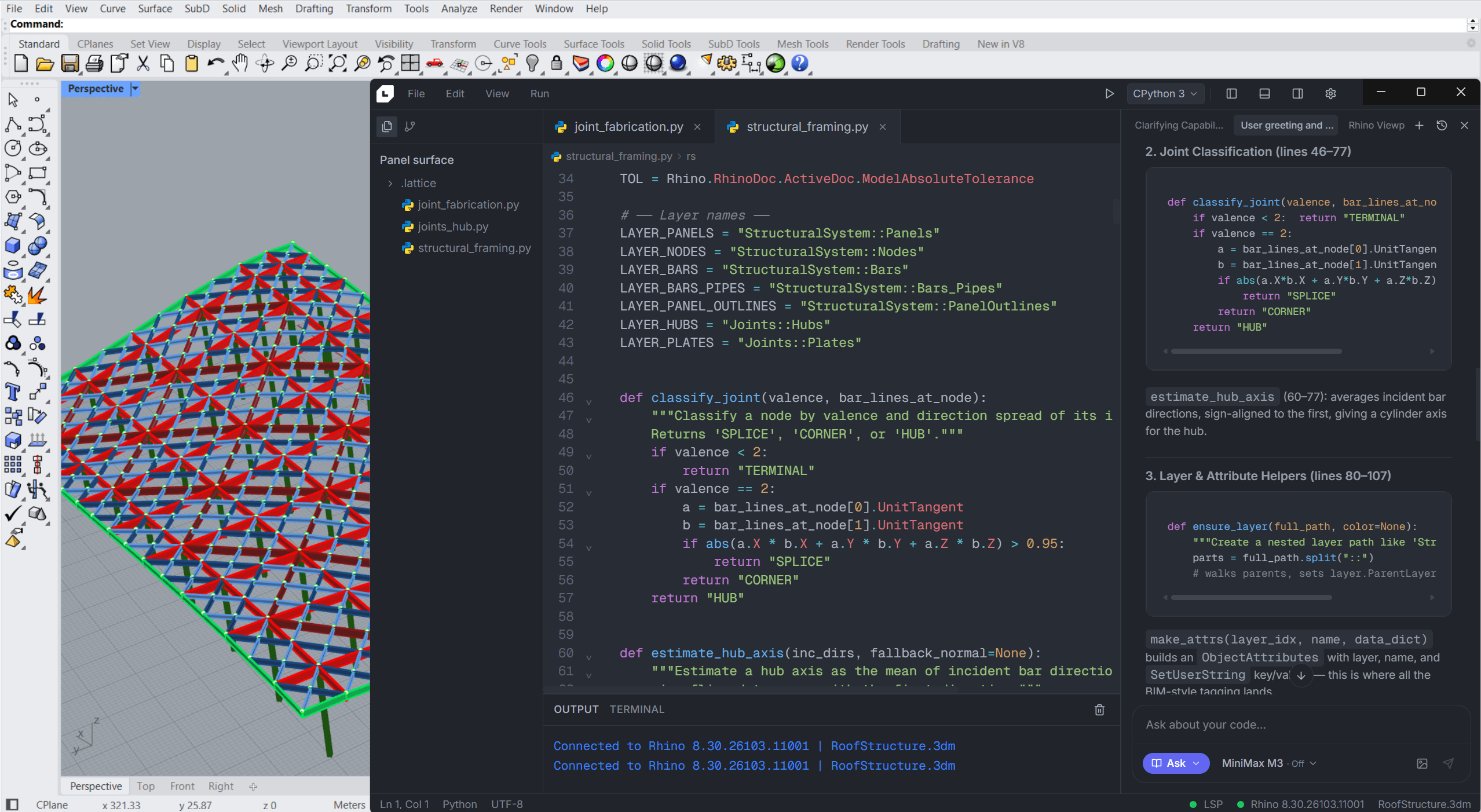
A real editor for Python and C#
Completions, error checking and one-click runs in Rhino, with git built in. For the scripts and tools your practice relies on.
massing — Latticemassing
- contour_mass.py
- beam_tags.cs
- site_grid.py
- pyrightconfig.json
1#! python32import Rhino.Geometry as rg3import scriptcontext as sc45def contour_mass(brep, spacing):6 """Horizontal contours every `spacing` metres."""7 box = brep.GetBoundingBox(True)8 start = rg.Point3d(0, 0, box.Min.Z)9 end = rg.Point3d(0, 0, box.Max.Z)101112mass = sc.doc.Objects.GetSelectedObjects(False, False)13curves = contour_mass(next(mass).Geometry, 3.0)14for curve in curves: sc.doc.Objects.AddCurve(curve)15print(f"Added {len(curves)} contours")
Output
Output will appear here when you run code…
Grasshopper definitions from your intent
Describe the logic and the constraints. Lattice places, wires and solves the definition on your live canvas, fixes its own errors, and works with the plugins you already use.
LatticeWorks in your live Rhino model
It reads layers, objects and user text, runs scripts in your model and checks the result in the viewport. One Ctrl+Z undoes everything it did in a turn.
office-block.3dm — Rhino 8LatticePlan first, then build
Ask about your model, agree a plan, then let it build. Every change arrives as a diff you accept or reject.
facades — LatticePlans export-panels_plan.md
Bring your own agent
Already use Claude Code or Codex? Chat with them inside Lattice on your own plan, or connect Lattice's Rhino and Grasshopper tools to Cursor, Claude Code and Codex.
office-block — LatticeNew chatSettings Agents
In Lattice chat
Chat with your own agent, on your own plan.
CodexSigned inClaudeSigned inIn your terminal
Give other agents Lattice's Rhino and Grasshopper tools.
Claude CodeConnectedCursorConnectedCodexConnectopencodeConnectBuilt for the work you already do
An assistant for your skills, not a replacement for them. Talk through options and strategies, give it a clear brief with units, constraints and intent, and keep your eye on everything it builds.
- 01
Parametric modelling
Definitions and scripts with the parameters you choose.
Prompt Build a definition for a 12-storey twisting tower: 30 × 20 m floor plates, 3.5 m floor height, 3° rotation per floor. Sliders for height and twist.
- 02
Geometry rationalisation
Panelise, planarise and check tolerances on real surfaces.
Prompt Panelise the selected façade into planar quads no larger than 1.5 × 3 m, and colour each panel by its deviation from the surface.
- 03
Data export and management
Pull structured data out of the model, or push it back in.
Prompt Export every object on layer STR::Columns to CSV with its user text and volume in m³, one row per object.
- 04
Simulation and analysis
Set up studies with the plugins you already use.
Prompt Using Ladybug, run a sun-hours study on the roof surfaces for 21 June and bake the result as a coloured mesh on layer ANALYSIS.
- 05
Automated drawings
Sections, plans and layouts from the model, repeatable.
Prompt Cut sections every 3 m through the selected mass along X and place them on a new A1 layout at 1:200.
- 06
Custom tools
Script components and commands your team reuses.
Prompt Write a C# script component that numbers panels by row and column and writes the number to each panel's user text.
- 07
Task automation
The repetitive clean-up and setup work, done consistently.
Prompt Rename all layers to our standard (DISCIPLINE::Element, upper case), merge duplicates and purge empty layers.
- Get started
Your own workflow
If you can describe it precisely, Lattice can help you build it: as a script, a definition or a reusable tool.
Open, private and efficient
What your IT lead and your budget will ask about.
- 01
Any model, always current
Frontier and open models, curated by us as new ones arrive. Pick one per chat and choose how much it thinks before it answers.
Ask Lattice…
AgentClaude Sonnet 5.5 - 02
Runs on your machine
Lattice and its agent run locally and scripts run in your Rhino. Your files and geometry stay with you; only what the agent sends the model leaves your machine.
Your computer
Lattice
editor
Agent
runs locally
Rhino 8
your model
Your files and geometry stay here.
messages
Model provider
the model you choose
licence
latticecode.dev
licence and updates
- 03
More work per dollar
Lattice's Rhino and Grasshopper tools are built to use as few tokens as possible: the agent reads compact summaries of your canvas and model, not whole files, and searches the Rhino API locally. Less to send, less to pay.
Your canvas
What the agent reads
5 objects, 3 wires.3f2a9c1e Number Slider "Radius" [Params/Input]c81e7f40 Circle [Curve/Primitive] in R/Radius Number expr "x*2" ← 3f2a9c1e (slider "Radius" 5) → = 10e5d3a917 Loft [Surface/Freeform] (disabled) ! Error: Curves are not compatible
One plan. Any model.
$12/month for Lattice, or $99/year. AI usage is billed separately by the model provider, so you only pay for what you use.
- 01
Everything included
Both plans include the editor, the Lattice agent, every Rhino and Grasshopper tool, and the Lattice MCP to use those tools from Claude Code, Codex or Cursor. Two devices per subscription, and every new release as Lattice improves.
- 02
Pay only for what you use
Usage is billed by OpenRouter at their price. No credits, no Lattice markup. A quiet month costs nothing extra.
- 03
Already pay for Claude or ChatGPT?
Use your Claude Code or Codex plan inside Lattice, with all of Lattice's Rhino and Grasshopper tools.
Cancel anytime and keep access until the end of your billing period.Cancellation policy
Recently shipped
Lattice updates itself. These are the latest releases.
- v0.2.0
Chat with your own Codex or Claude Code, two new light themes, and more reliable script runs from Rhino.
- v0.1.2
Lattice 0.1.2. Stable release.
Questions, answered
Anything else? Write to hello@latticecode.dev.